
Lucky Dreams App Download Canada
Mobile play for Canadians: install safely , use secure banking , and enjoy legal casino action on any device.

Lucky Dreams App: Legal Mobile Play In Canada
Mobile casino play has become the default for many players because it fits real life. You can spin a few rounds during a break , join a live table in the evening , or check promotions without sitting at a desk. The best mobile experience feels effortless: fast loading , clean menus , and an interface that works with your thumb instead of fighting it.

This platform operates in Canada and is completely legal for Canadian players who meet local age requirements. That legal status matters because it usually comes with predictable standards: secure account handling , responsible gaming controls , clear terms for offers , and a structured process for withdrawals. In other words , it’s not just “you can access it ,” but “the environment is designed to function properly for Canadian users.”
If you want to start smoothly , think in three layers:
- Device readiness
Make sure your phone or tablet is updated , has enough free storage , and isn’t overloaded with background apps. Performance issues often come from the device , not the casino. - Account readiness
Use accurate personal details during registration. Keep your email secure. Choose a strong password. If verification is requested later , mismatched details are the most common reason for delays. - Payment readiness
Choose one funding method at first and keep it consistent. Switching methods constantly in the first week can create confusion for you and may trigger additional checks designed to protect accounts from unauthorized activity.
Mobile play also changes behavior: because deposits can feel “one tap away ,” it’s easier to overspend if you don’t set boundaries. The healthiest approach is to decide your session budget before you fund and use built-in tools like deposit limits or time reminders. Those features are not “for emergencies”-they’re everyday controls that keep entertainment enjoyable.
Below is a simple table that helps you evaluate whether your device and setup are ready for a smooth mobile session.
| What to check on mobile | Why it matters | Quick fix if needed |
|---|---|---|
| Storage space | Prevents slow loading and crashes | Delete unused apps/files |
| OS and browser updates | Improves security and stability | Update OS + browser/app |
| Connection quality | Reduces buffering in live tables | Switch to stable Wi-Fi |
| Battery health | Avoids overheating and lag | Lower brightness , close apps |
| Secure login habits | Prevents account takeovers | Use strong password + device lock |
| Responsible play tools | Helps control spending | Set deposit cap + time reminder |

Lucky Dreams Download: Safe Install Steps
When you install a casino app , the most important rule is simple: use official sources. Fake download pages are a common problem in the wider online world , especially around popular brands and “bonus” searches. The safest path is to use the operator’s official install flow , bookmark it , and avoid random links shared in comments or low-quality directories.
Before you install , do a quick safety routine:
- Check that your device lock is enabled (passcode , fingerprint , or Face ID).
- Make sure your email account is secure (because password resets rely on it).
- Avoid installing while connected to public Wi-Fi.
- Close background apps so the install and first launch run smoothly.
After installation , do a calm first launch. Don’t rush into deposits. First , explore the lobby , open a few games , and confirm everything loads properly. Then check the cashier area and verify that you understand where transaction history is displayed. This “tour first” approach reduces mistakes and makes the experience feel controlled.
A good mobile platform also makes updates simple. Updates are important for security , performance , and compatibility with new device versions. If you ever see unusual behavior-like slow loading , login loops , or missing buttons-an update often fixes it quickly.
If you prefer not to install anything , many modern casinos support instant-play in a mobile browser. Browser play can be a great option when storage is limited , when you’re using a temporary device , or when you want a quick session without extra steps. The key is using a modern browser and keeping it updated for stability and security.
Lucky Dreams Casino App: Mobile Features Overview
A strong mobile casino experience isn’t just “the same site on a smaller screen.” It’s design that matches how people actually play on phones: short sessions , quick navigation , simple controls , and fast access to support and banking. The most valuable features are the ones that reduce friction.
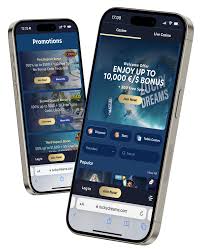
Two things usually define a great first impression: speed and clarity. Speed means games open quickly and menus don’t lag. Clarity means you can find what you need (games , cashier , promotions , support) without hunting through endless submenus.
Another big factor is how the platform handles identity and security. A legal Canadian-facing operator typically uses secure connections , standard verification practices for withdrawals , and protections against unauthorized access. When those protections are built well , you barely notice them until you actually need them.
Lucky Dreams Mobile Casino: Smooth Gameplay Tools
Mobile play should feel stable across different screen sizes. Helpful tools include:
- Search and filters that work properly on small screens
- Favorites or “recently played” lists to reduce browsing time
- Clear paytables/rules that don’t require zooming endlessly
- Demo play options for learning games without pressure
- Adjustable sound and performance settings for comfort
The best mobile sessions feel “light.” You don’t want your phone overheating , your battery draining instantly , or the interface forcing extra taps for every action. If the platform is optimized well , you can move from lobby to game to cashier and back without friction.
Lucky Dreams Casino Mobile: Account Controls And Safety
On mobile , security isn’t optional-it’s essential. The simplest safety stack looks like this:
- A unique password that you don’t reuse elsewhere
- A secured email inbox (because it controls resets)
- Device lock enabled (biometric or passcode)
- No account access on shared devices
- Document uploads only through official secure channels
For legal play in Canada , verification is a normal step before withdrawals. If you plan to cash out later , it’s smart to complete verification early. That turns “waiting later” into “done already ,” and it’s one of the best ways to keep payouts smooth.
Lucky Dreams Download For Android: Install And Updates
Android users typically care about three things: easy installation , stable performance , and clean updates. A smooth Android install should be quick , with clear prompts and predictable permissions. If you see confusing requests for unrelated permissions , that’s a red flag-casino apps generally shouldn’t need access to things like your contacts.
A stable Android experience also depends on your device settings. If you’re running low on storage , performance drops. If you keep many apps open , games may lag. And if your network connection is unstable , live streaming will buffer. These issues are usually solved with basic device hygiene: free some space , close background apps , and use stable Wi-Fi for live content.
Android players also benefit from a simple “update habit.” Keep your OS updated , keep the app updated , and restart your device occasionally. Many “it feels broken” moments disappear after an update and reboot.
Lucky Dreams App For Android: Setup Checklist
For the cleanest Android setup:
- Update Android OS and Chrome (or your chosen browser)
- Enable device lock (PIN/biometrics)
- Use a strong , unique password for the account
- Avoid installing over public Wi-Fi
- After install , open cashier history and learn where statuses appear
Once setup is complete , do a small test session to confirm performance. Open a few games , check navigation , and locate support. Confidence comes from familiarity.
Lucky Dreams Download APK: When It Makes Sense
Some Android users prefer an installation package route for flexibility. If you go this path , the safest approach is using the official source only and verifying you’re not downloading from a third-party mirror. Third-party sources are the biggest risk factor in APK installs because they can be modified or bundled with unwanted extras.
If you ever use an installation package , keep security strict:
- Install only from the official page
- Check your device security settings
- Disable “unknown sources” again after install
- Keep the app updated through official updates
If you don’t need this route , the easiest option is the standard install flow offered by the operator.
Download Lucky Dreams: Android Performance Tips
Smooth mobile sessions are often about small habits:
- Close background apps before launching games
- Use battery saver cautiously (it can throttle performance)
- Lower live stream quality if buffering happens
- Keep at least a few GB of free storage
- Restart your phone if it gets hot or slow
If you do these basics , most Android devices run casino games comfortably.
Lucky Dreams Download iOS: iPhone And iPad Guide
iOS users usually expect clean design and stable performance-and iOS often delivers that when apps are built properly. A smooth iPhone or iPad experience should feel consistent: fast loading , stable sessions , and no strange permission requests. Apple’s ecosystem also tends to make wallet-style payments and biometric login feel seamless when supported.
If you’re playing in Canada , the most important non-technical step is still the same: use accurate account details and be ready for standard verification before withdrawals. Legal operators typically follow predictable compliance steps , and iOS convenience doesn’t remove those requirements-it just makes the experience smoother.
For best results on iOS:
- Keep iOS updated
- Keep Safari updated
- Avoid public Wi-Fi for deposits , withdrawals , or document uploads
- Use Face ID/Touch ID device security
- Monitor storage , because low storage can cause slowdowns
Lucky Dreams Download iOS: Smooth Install Routine
A calm installation routine prevents problems:
- Install using official sources only
- Open the app and confirm the lobby loads properly
- Check cashier and transaction history layout
- Locate the support option and note how to contact help
- Set a deposit limit if you plan to fund immediately
If anything feels slow or unstable , updating iOS and restarting the device resolves many issues.
Lucky Dream App Free Download: What “Free” Really Means
Many players search for “free” installs. In practice , “free” usually means the application itself costs nothing to install. It does not mean gambling is free. Real-money play requires deposits , and promotions (like bonus funds or free rounds) typically come with terms such as wagering requirements and withdrawal rules.
A healthy approach is to treat promotions as structured offers:
- Read the wagering requirement
- Check eligible games
- Review time limits
- Confirm maximum cashout rules (if any)
Doing this upfront prevents disappointment later and keeps play enjoyable.
Lucky Dreams Casino App Download: Browser vs Installed App
Some players prefer installed apps for convenience and speed. Others prefer browser play to save storage and reduce installs. Both can be valid , and your best option depends on your device and habits.
Installed app strengths:
- Faster access and smoother navigation
- Potential extra features like notifications or quick login
- More stable “one environment” experience
Browser play strengths:
- No install required
- Great for limited storage
- Easy to switch devices quickly
If you’re unsure , start with browser play to test performance , then install if you want faster access.
Lucky Dreams Download: Comfort , Battery , And Data Use
Mobile comfort matters more than most people admit. If your phone overheats , the session stops being fun. If your battery drains fast , you’ll rush decisions. If your data use spikes , you may avoid playing outside Wi-Fi.
Simple comfort tips:
- Lower brightness and disable unnecessary background sync
- Use Wi-Fi for live dealer streaming
- Take breaks in longer sessions
- Keep the device cool (avoid charging during heavy streaming)
Small adjustments can make the experience noticeably better.
Lucky Dreams App FAQ For Canadian Players
Is mobile play legal in Canada for real money?
Yes. The platform operates in Canada and is completely legal for Canadian players who meet local age requirements and follow responsible gaming rules.
What’s the safest way to install on a phone?
Use official sources only , avoid public Wi-Fi during installation , and keep your device and browser/OS updated.
Why do withdrawals take longer than deposits sometimes?
Withdrawals often include security and verification steps , which are standard for legal operators and designed to protect players.
What should I do if the app feels slow or keeps crashing?
Free up storage , close background apps , update the OS/app , restart your device , and use stable Wi-Fi for streaming content.
Can I switch between phone and tablet without issues?
Usually yes. Just keep login credentials secure , avoid shared devices , and use the same verified account details for consistent access.
How can I avoid overspending on mobile?
Set a deposit limit and a session reminder before you start , deposit once per session , and stop when you reach your planned budget.